How to Redeem Anime Avatar Fighting Codes
Shop on the left, Extra tab, Redeem box, Redeem button. One use per code.
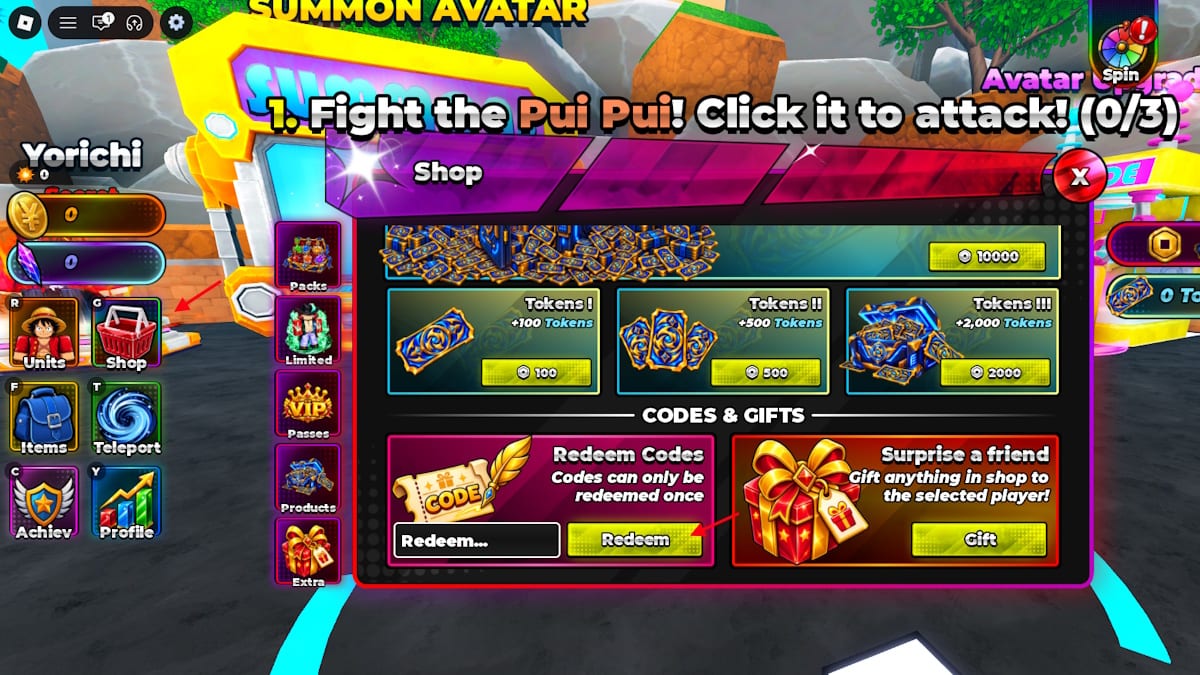
Codes in Anime Avatar Fighting hide one layer deeper than most Roblox shops. They are not on the left HUD, not on Packs, and not on the Gift panel. They live on Extra inside Shop. This page is the click path, the UI labels from a live session, and the mistakes that make TRADE look expired when it is not. Keep the working codes table open in another tab so you can paste without retyping.
The game is a released incremental simulator on 10-player shared servers. You still want every gem before you walk to Summon Avatar. Redeeming is free. It does not cost Robux.
The exact path
- Launch Anime Avatar Fighting on Roblox and wait until the world loads. The first tutorial line is Fight the Pui Pui! Click it to attack! (0/3). You can open Shop during that quest.
- Look at the left HUD. The buttons are Units, Shop, Items, Teleport, Achiev, and Profile. Tap Shop.
- The Shop window uses tabs: Packs, Limited, Passes, Products, Extra. Skip Packs. Open Extra.
- Extra shows CODES & GIFTS. The code side has a box labeled Redeem…, a Redeem button, and the line Codes can only be redeemed once. A Gift panel sits next to that box. Do not type codes into Gift.
- Paste one string from the live codes list. Press Redeem. Watch Coins, Gems, spins, or potions land.
- Repeat until every row is used. Close Shop and spend gems at the Summon Avatar machine in the world.
Codes are not case-sensitive. Copy-paste is still the right habit. 1KDISMEMBERS, HAPPYBIRTHDAYOSAMA, and 100KVISITS are the strings people mistype.
What each Shop tab is for
Packs, Limited, Passes, and Products sell things. Extra is the only tab with Redeem. Products is where Token I, Token II, and Token III sit for +100, +500, and +2000. Those token packs are purchases. Typing TOKENII into Redeem will not grant tokens.
The spin wheel sits in the top-right of the world HUD, not inside Extra. Code spins go to that wheel after Extra accepts the string. Potions go to Items. Open Items after a big paste such as 1KLIKES so you can see Damage, Luck, Drop Chance, Coin, Gem, and XP bottles instead of assuming the redeem failed.
Gift panel versus Redeem
CODES & GIFTS is one Extra view with two jobs. Redeem is for promo strings. Gift is for other grants, including loyalty gifts if you played Anime Fighting Simulator. If you paste TRADE into Gift, nothing useful happens. If you ignore Gift entirely on a fresh account, you still get every code. Check Gift once if you already have time in Anime Fighting Simulator, then return to Redeem for the rest of the table.
Why a code fails
Stay on Extra. A code typed on Packs never fires. Restart the client if the box ignores taps. Rejoin is cheap because servers hold 10 players. If the message says you already redeemed it, the Extra warning was literal: one use per account, not one use per server.
Do not add spaces before or after the string. Do not add punctuation. TRADE is the Trade update code; UPDATE0.5 is the Update 0.5 code. They are different strings. Paste them separately.
There is no expired list in September 2026. If a brand-new string from a screenshot fails, you likely typed a lookalike. Recopy from the codes hub table instead of from memory.
What to do the minute Extra succeeds
Gems (purple crystals) buy summons. Walk to Summon Avatar and follow how to summon avatars before the urge to idle wins. Coins (gold) fund the rest of the loop; a Coin potion does not spend itself. Open the potion I, II, and III guide so you do not drink Damage Potion II on the three-click Pui Pui tutorial.
Join the Avatar Fighting Team group for free Auto Attack and Fast Machines. Auto Attack is not a code reward. It is a group perk. Fast Machines is the same. Codes still matter because Auto Attack needs a unit worth attacking with.
If the HUD itself is unclear, the controls and HUD map names the same left-side buttons this page uses. After codes, the beginner route is the next read, then raids once World Bosses are on the table.
New strings usually land next to patches. TRADE arrived with the Trade update. UPDATE0.5 arrived with Update 0.5. Watch the official Discord for the next Extra drop, then paste it here the same way.
Redeem is a one-minute job. The only lasting mistake is leaving Extra with 1KLIKES unspent because you were staring at Packs. Paste the table, close Shop, and put the gems into a summon before you start a raid.
Frequently Asked Questions
Quick answers for codes, summons, raids, and upgrades.
Where is the Redeem box in Anime Avatar Fighting?
Left HUD, Shop, Extra tab, CODES & GIFTS. The box reads Redeem... and the button reads Redeem. It is not on Packs or on the Gift panel.
Is the Gift panel the same as Redeem?
No. Gift is for other grants, including loyalty gifts if you played Anime Fighting Simulator. Promo codes only work in the Redeem box.
A code did nothing. What now?
Confirm Extra is selected, paste with no extra spaces, and try one more time. Restart if the UI is stuck. If it says already redeemed, that account used the string.
Do I need Robux to redeem codes?
No. Redeem is free. Token I, II, and III in Products are paid shop packs and are unrelated to the code box.
Are codes case-sensitive on this Extra screen?
No. The box accepts mixed case. Copy-paste is still recommended so you do not drop a character from 1KDISMEMBERS.