Anime Avatar Fighting How to Trade
TRADE title prefix, the TRADE code, and Extra Gift to a selected player.
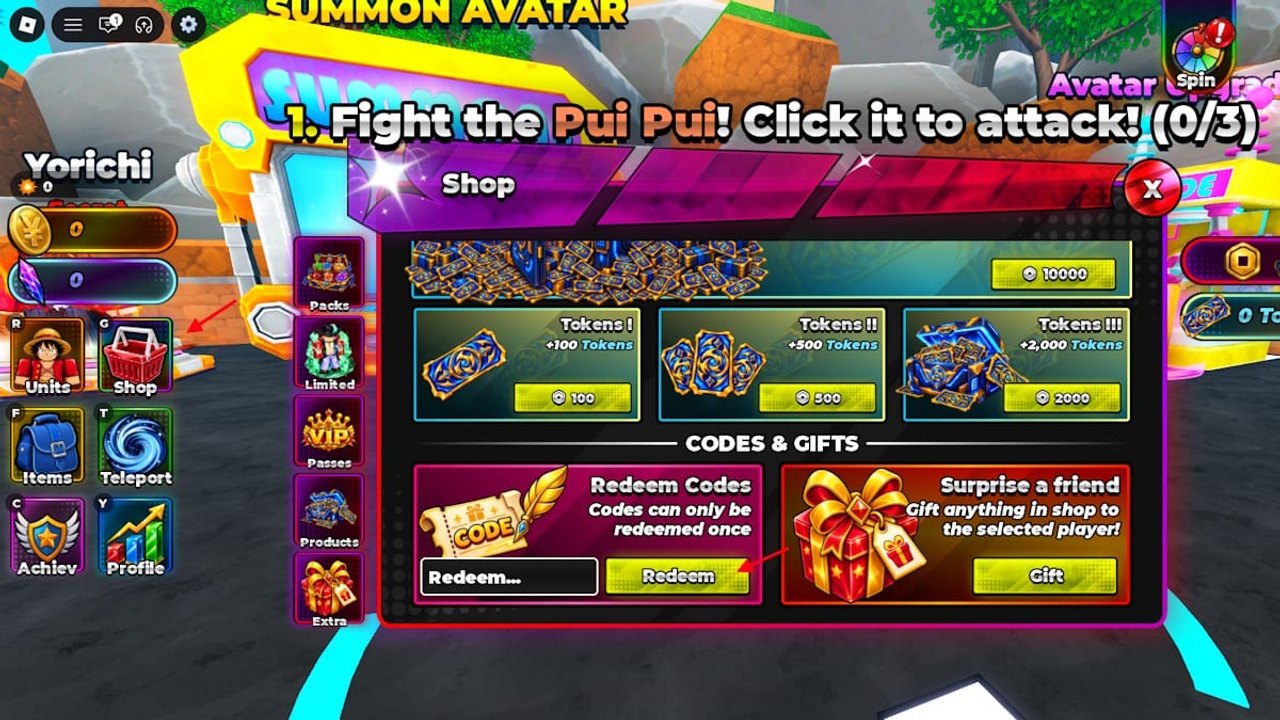
Trading is live in Anime Avatar Fighting. The Roblox title prefix reads TRADE. The TRADE code dropped with that patch. Extra in the Shop can Gift a shop item to a selected player. That is the whole supported social economy this wiki will describe. There is no documented auction house, listing board, or player stall to write about, so this page stays inside Gift plus the Trade patch.
If you still need Auto Attack, codes, or a first summon, finish the beginner first-hour walkthrough first. Gift is not a beginner unlock puzzle. It is a Shop Extra row you ignore until you have a spare.
Confirm the Trade patch is the live client
Look at the Roblox title. TRADE in the prefix means you are on the Trade-era client, not an old screenshot. Read the Trade update recap for patch context and the Updates hub if other notes landed after. Update 0.5 notes is a separate beat that paid gems and potions; do not mix those reward tables into Gift.
Redeem TRADE from Extra if you have not used it on this account. Codes are one use. The working codes list and code redeem steps keep the string current. This page will not reprint the full table. TRADE pays gems and potions that you should spend on summons or raids, not on a fantasy marketplace.
Servers still hold ten players. Online means you can select another player in the server. It does not mean a global bazaar. If the person you want to Gift is not in the instance, you cannot select them from Extra.
Extra Gift: shop item to a selected player
Open Shop on the left HUD. Tabs are Packs, Limited, Passes, Products, and Extra. Extra holds Redeem Codes and Gift. Gift sends a shop item to a selected player. Select the player first, then the item, then confirm. If Gift is grey, you are not in a state where a target is selected or the item is not a shop item. Units, Champions, and random world drops are not automatically Gift targets just because they sit in a box.
Gift is not Upgrade. It will not Refine or Ascend anything. If you meant to power a unit, open the Upgrade Refine Ascend path. If you meant to roll, walk to the machine with the Summon Avatar and Champion hatch steps. Gift is for moving a shop purchase or shop stock you already own.
Be conservative with Robux items. If you bought a Pack, Limited, or Pass product, understand you are sending that shop item, not creating a tradable listing other people can bid on. Passes such as Lucky, Fast Hatch, and +5 Eggs remain optional personal speed tools. This page does not treat them as a trade currency.
What this is not
It is not an auction house. It is not a cross-server catalog. It is not a way to swap avatars by unofficial names. This wiki does not invent a character roster and will not tell you to “trade a named pirate swordsman” because key art looks familiar. Rank what you keep on the avatar power ranking and Champion ranking. Move shop items with Gift. Keep carries.
Do not Gift your last Damage III before a boss. Drink potions on the world boss and raid route. Do not Gift your last Luck flask before a gem dump. Potion rungs stay I 25 percent, II 50 percent, III 100 percent for fifteen minutes on potion I II III tiers.
Practical etiquette in a ten-player server
Use chat or Discord (invite on the official links hub) to agree what will be Gifted before you open Extra. Select the correct player portrait. Watch the confirm pane. If you Gift the wrong person, there is no wiki-documented rollback. Stay in the server until the item shows on their side.
Leaderboards and Profile are unrelated. Gifting will not buy a rank. Achiev may track account milestones, but Gift is not a substitute for pushing areas and worlds. Swords, skins, auras, and accessories follow the same rule as other shop items: if Extra offers that item as a Gift target, it can move; if it only sits on a unit, it stays equipped.
Controls for opening Shop and selecting HUD rows are on the HUD and click-to-attack map. Optional Scripts overview, auto farm notes, and auto summon notes do not Gift for you. Group Auto Attack does not Gift for you. You press Extra.
After a Gift, return to the farm. The Trade patch did not replace summons, raids, or the three upgrade verbs. Browse the Guides hub if you opened this page looking for a marketplace that is not in the client.
Gift versus Trade-patch closeout: the title prefix tells you the patch is live, TRADE is a one-use Extra code, Gift sends a shop item to a player you selected in this ten-player server, and nothing on this wiki describes listings, bids, or an auction house. If a social post promised one, treat it as unverified until Avatar Fighting Team ships it.
Frequently Asked Questions
Quick answers for codes, summons, raids, and upgrades.
Is trading live or still a teaser?
Live. The title prefix is TRADE and the TRADE code dropped with that patch. Read the Trade update recap for the patch write-up.
How do I Gift an item?
Shop on the left HUD, Extra tab, select a player in the server, Gift a shop item, confirm. There is no documented auction house.
Can I Gift avatars and Champions from my box?
Gift targets shop items. Do not assume Units copies are Extra Gift targets. Keep carries for the Upgrade Refine Ascend path.
Does the TRADE code unlock Gift?
No. TRADE is a one-use Extra Redeem string that pays gems and potions. Gift is a separate Extra row. Use the working codes list for the string.
Can I Gift someone in another server?
Select a player in your current ten-player server. This wiki does not document a cross-server catalog. Meet in the same instance first.